Scheduling COVID-19 Injection Activities
Scheduling a COVID-19 Injection Activity is recommended when a patient wants to book an appointment to get the vaccine ahead of time.
Two types of COVID-19 Injection Activities can be scheduled in the Activities dashboard:
-
COVID-19 Injection - used to schedule the 1st dose of the COVID-19 vaccine.
-
COVID-19 Injection Follow-up - used to schedule subsequent doses of the COVID-19 vaccine.
When a COVID-19 Injection Activity is scheduled, your pharmacy will be able to:
-
Track when patients are coming in for scheduled appointments. This helps to ensure you have proper inventory levels of the vaccine and proper staffing levels.
-
Process prescriptions directly from the scheduled activity with the information auto-populated. This save you time from creating and entering prescription information and have it automatically populated based on the information from the activity.
Note: A COVID-19 Injection Activity can only be completed by processing the COVID-19 vaccine prescription from the scheduled activity. For more information, see Processing COVID-19 Vaccine Prescriptions.
If a COVID-19 vaccine prescription is not processed from the COVID-19 Injection Activity, the activity can be deleted from the Activities dashboard.
COVID-19 Injection Activities can be scheduled from either the Activities dashboard or from the COVID Injection window when processing a COVID-19 vaccine prescription.
Use the dropdowns below to learn more about each option.
 Activities Dashboard
The COVID-19 Injection Activity Type and the COVID-19 Injection Follow-up Activity Type can be scheduled from the Activities dashboard.
To schedule the COVID-19 Injection activities in the Activities dashboard:
-
From the Workbench, select Activities.
-
Select New. A window appears to create a new activity.
-
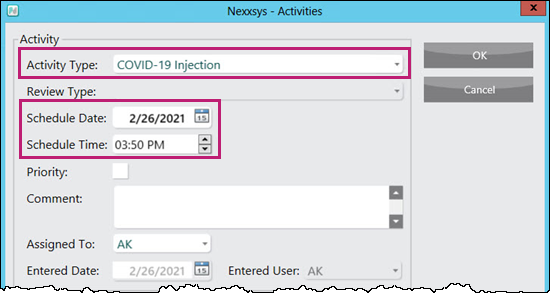
In the Activity section, enter the following information:
-
Activity Type - COVID-19 Injection (for the 1st dose) or COVID-19 Injection Follow-up (for subsequent doses)
-
Scheduled Date - the date the appointment is scheduled for
-
Scheduled Time - the time the appointment is scheduled for
-
-
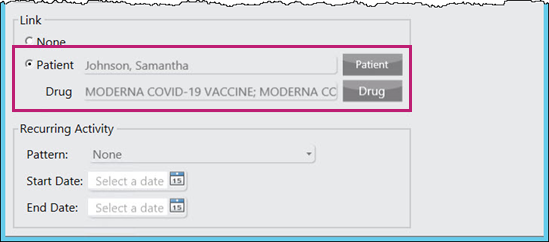
In the Link section, enter the following information:
-
Patient - the patient receiving the COVID-19 vaccine
-
Drug - the COVID-19 vaccine dispensed.
Note: Drug can be left blank if it is unknown at the time of scheduling which vaccine will be used. The vaccine can later be selected by modifying the activity or when processing the prescription.
-
-
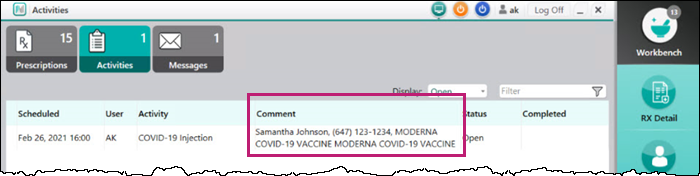
Select OK. The activity can be viewed in the Activities dashboard for the day it was scheduled.
The following information displays in the Comments column for easy reference:
-
Patient Name
-
Phone Number
-
COVID-19 Vaccine selected
COVID Injection Window
When processing a COVID-19 vaccine prescription, a COVID-19 Injection Follow-up activity can be scheduled from the COVID Injection window, under the Schedule Follow-up Injection section.
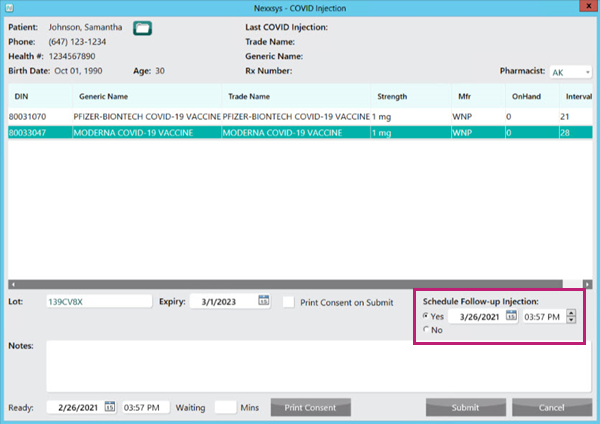
In the follow-up section, you can select on the of the following:
-
Yes - selected by default if this is the initial dose or being processed from a COVID-19 Injection activity. A COVID-19 Follow-up Injection activity will be scheduled once Submit is selected. The date is defaulted based on the interval days of the vaccine (recommended days between doses), but can be changed.
-
No - selected by default if this is a subsequent dose or being processed from a COVID-19 Injection Follow-up activity. A COVID-19 Injection Follow-up activity will not be scheduled.
Note: If processing a prescription from a COVID-19 Injection Follow-up activity, the option to schedule a follow-up injection is defaulted to No.
Once the prescription is processed, a COVID-19 Injection Follow-up activity is created in the Activities dashboard on the date the follow-up was scheduled for. The following information displays in the Comments column for easy reference:
-
Patient name
-
Phone number
-
COVID-19 vaccine selected
Note: When scheduling a COVID-19 Injection Follow-up activity through the COVID Injection window, the vaccine used in the initial injection is automatically selected.
Additional Information
Hold, escaped or cancelled prescriptions
When processing the COVID-19 vaccine prescription, if the prescription is placed on Hold, escaped from or cancelled, the follow prompt displays.
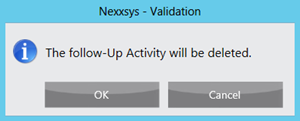
Select one of the following options:
-
OK - continue with the hold, escape or cancellation process. Removes the follow-up activity currently in the Activities dashboard. If required, a new activity must be scheduled for the initial dose.
-
Cancel - stops the hold, escape or cancellation process. The follow-up activity is not removed.
Prescription already in process
When trying to edit, delete or process an activity but there is already a prescription in process, the following prompt displays.
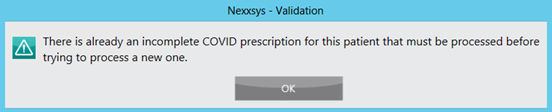
Locate the prescription on the Workbench or patient's Profile tab and continue to process the prescription as usual.